Fighting Chance

I have been trying to do some balancing with my roguelike game engine. It felt too hard at the start. If you could not locate a weapon before the monsters found you, death was a sure thing. I want players to be able to survive the first level in general. So I thought I would provide the player with some default items to start.

Now at the beginning of the game, I automatically equip the players with one weapon and one piece of armor. I choose these from the maze. And I pick the least desirable weapon and armor. However something is better than nothing.

I also added the ability to quit the game. I give the user the opportunity to confirm the exit. Then the game automatically ends.

Collapsing Unique Monsters

I had previously hacked together some code that dealth with regular and unique monsters. The problem was that this code was separate. I had routines that dealth with regular monsters. And I had routines that dealt with uniques. This was cumbersome. So today I combined the two.

The breakthrough came when I decided that uniques act just like regular monsters in the dungeon. The real difference lies when you create them initially, or kill them. In both scenarios there is only one unique. If you kill it, you don't see that specific monster any more. That is unlike regular monsters such as an orc. You can kill an orc. But you might encounter other different orcs on the same level.

Next up I want to give the player a better chance at startup. Perhaps they could get a daggar and a cloak. It would give them a small fighting chance until they find better items in the dungeon.

Surrounded by Design

I made some changes to the monster movement artificial intelligence. Previously monster would try to move toward the player in the most direct route. If blocked they might try to move vertically or horizontally to align with the player. However this resulted in monsters lining up, and only one attacked the player. That was not realistic. Today I implemented the first part of fixing that.

If the monster is lined up with the player, but prevented from moving toward the player, it will try to go around whatever is in the way. Currently it will only try to go left/right, or up/down. That means there are 3 lanes available to go toward the player: (1) the direct route, one that is left/up, or one that is right/down.

Ideally I would have the monsters keep moving around to get at the player. But I think I have hit the sweet spot for now. I also modified messages in version 0.05 of my roguelike game engine. The messages show up on the right side of the main screen. They also start the first message at the top.

Next I plan to implement unique monsters, weapons, and armor.

True Message History

Previously I had added a scrolling list of messages on the main screen of my roguelike game. The list was 10 messages deep. What happens if you want to find a message older than the last 10? You are out of luck. Until now.

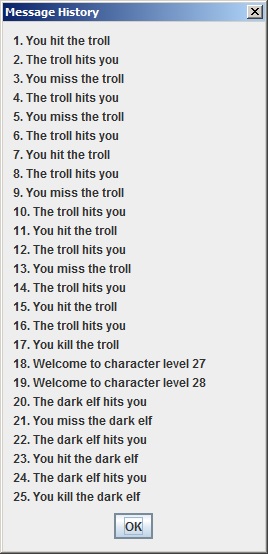
Today I implemented a true message history functionality. You must use the CTRL+P keyboard combination. This brings up another dialog with a history of the messages displayed. Currently I show the last 25 messages. But it should be trivial to provide some more.

I really should allow the player to scroll back really far in the message history. The history screen will need to be a little more complex. But I think I can do it. It is not a high priority. But it should be useful.

Next I want to relocate the location of the messages on the main game screen. The area it occurpies now is high priced real estate. I need that area for more important stats. I plan to move the messages over to the right side of the screen. That should not be that hard. I control all the screen locations with variables.

Message History

Previously my roguelike game engine displayed one line of messages. This meant that when multiple messages were generated around the same time, you could only see the last one. That has been corrected in version 0,03 of my game engine. Now I provide a viewport on screen that shows the last 10 messages.

I also significantly upped the number of rooms in the maze from 60 to 200. Before you could travel the outskirts of the maze and not see too much scenery. The player would get the feeling that the movement keys were not working. Now there are so many rooms that you see them scroll by even when on the edge of the maze.

Finally I experimented with different colors to drzw the maze. My computer is old and is getting some screen burn in. The white on black background seemed to be contributing to the problem. I tried a gray color. But that was too hard to see. I have settled on a light gray color. However I might create and use a custom color that is a little brighter.